

Want to process Arabic in your application — ex. search, word sort, machine translation, question answering, etc.? Then, you absolutely need the Farasa segmenter. In this post, I will: explain Arabic segmentation, show the effectiveness of Farasa, and point to how to download and use Farasa.
Arabic words are derived from a set of several thousand roots. A root is fit into a so-called stem-template to form a stem, and stems can accept a variety of prefixes and suffixes such as coordinating conjunctions and pronouns. For example, the root “ktb” (كتب) can be fit in the stem-template “CCAC” to form the stem “ktAb” (كتاب — meaning “book”). That stem can accept many prefixes and suffixes to generate hundreds of possible word or surface forms, such as “wktAbnA” (وكتابنا — meaning “and our book”).
Arabic word segmentation involves breaking words into its constituent prefix(es), stem, and suffix(es). For example, the aforementioned word from: “wktAbnA” is composed of the prefix “w” (و — “and”), stem “ktAb” (كتاب — “book”), and a possessive pronoun “nA” (نا — “our”). The task of the segmenter is to segment the word into “w+ktAb+nA” (و+كتاب+نا). Segmentation has been shown to have significant impact on NLP applications such as MT and IR.
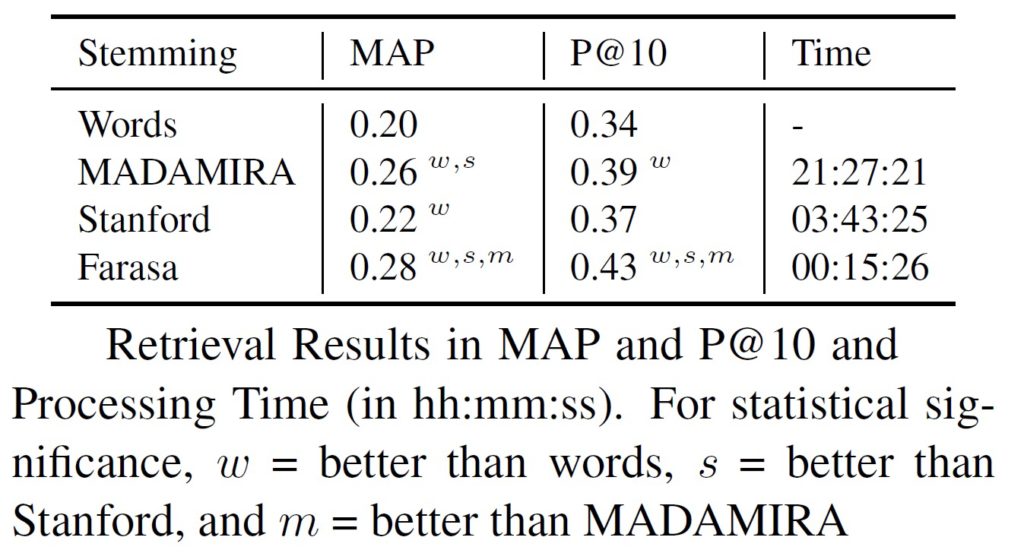
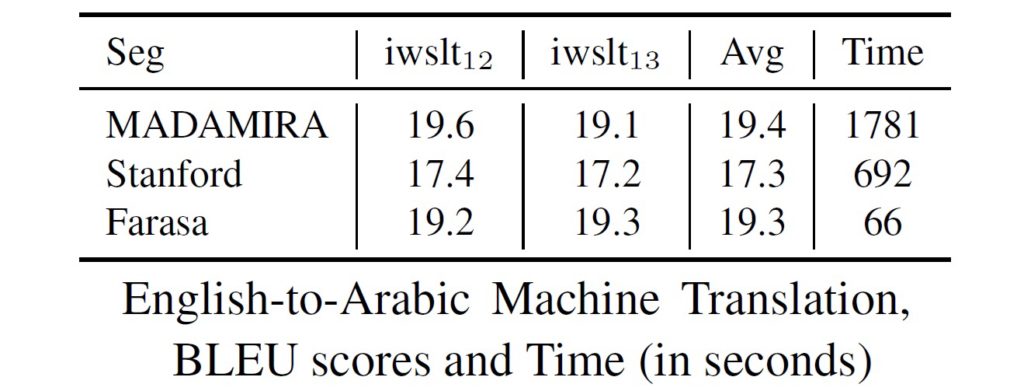
Farasa, meaning “chivalry” in Arabic, is a state-of-the-art Arabic segmenter that is super accurate, wickedly fast, and wonderfully easy to use. It is able to segment 98.9% of Arabic words correctly. Farasa is able to analyze 7.4 million words on a MacBook Pro with 2.5 GHz Intel Core i5 processor and 16 gigabytes of RAM in 2 minutes and 16 second, without any caching. As shown in the following tables, the effects of the segmentation of Farasa on machine translation and search are impressive in quality and speed compared to other available tools.
Farasa is 100% pure Java and is packaged as one jar file. Using Farasa is very simple. In command line mode, you can invoke it using the following command:
java -jar dist/farasaSeg.jar -i <inputfile> -o <output_file>
If you want to integrate it in your code, here is some sample code:
package tryingfarasa;
import com.qcri.farasa.segmenter.Farasa;
import java.io.FileNotFoundException;
import java.io.IOException;
import java.util.ArrayList;

public class TryingSeg {
    public static void main(String[] args) throws IOException, FileNotFoundException, ClassNotFoundException {
        Farasa farasa = new Farasa();
        ArrayList<String> output = farasa.segmentLine("النص المراد معالجته");
                for(String s: output)
                System.out.println(s);
     }
}
Best of all, Farasa is open source! You can try it online and/or download it from: http://farasa.qcri.org. For more information, please refer to my papers on Farasa:
- Kareem Darwish and Hamdy Mubarak. 2016. Farasa: A New Fast and Accurate Arabic Word Segmenter. LREC-2016.
- Ahmed Abdelali, Kareem Darwish, Nadir Durrani, Hamdy Mubarak. 2016. Farasa: A Fast and Furious Segmenter for Arabic. NAACL-2016.
Hi,
I am contacting you asking for help . I am a student and working on Arabic question answering system and need to use the dependency relations in my system. So how can I use Farasa tool to compare the dependency relation between two Arabic sentences in Python .
Thank you for your support,
the code is written entirely in Java. There should be a way to call Java from Python, but I might not be the best person to help you.
Using subprocess.call and specifying the command and parameters as a list.
Hi,
I am contacting you asking for help . I am a student and working on Arabic question answering system and need to use the dependency relations in my system. So how can I use Farasa tool to programming my system in Java .
Thank you for your support,
I sent you an email.
Kareem
Hope this finds you well.
I was wondering if there is any documentation for this tool. I need to perform a POS tagging for an Arabic Wikidump and can’t find any details what utilities is available in Farasa and how to use it. Thank you
you can access the tools from the following link:
http://qatsdemo.cloudapp.net/farasa/
how could i use it from python 3 ? i use
import subprocess
farasa=subprocess.call([‘java’, ‘-jar’, ‘d:/FarasaSegmenterJar’])
but it need more work ??? help please
I have never used subprocess before. I am sorry, I may not be able to help you.
you need to add the other parameters, the input path and output path for instance.
import subprocess
farasa=subprocess.call([‘java’, ‘-jar’, ‘d:/FarasaSegmenterJar’,
‘-i’, ‘inputfile’, ‘-o’, ‘outputfile’])
Hi Kareem,
For Constituency Parser, there is an error, filenotfound exception.
It seems that some model iteration is missing from the jar.
Exception in thread “main” java.io.FileNotFoundException: /var/www/farasa/constituency-parser/farasa-models/modelIteration10 (Aucun fichier ou dossier de ce type)
at java.io.FileInputStream.open0(Native Method)
at java.io.FileInputStream.open(FileInputStream.java:195)
at java.io.FileInputStream.(FileInputStream.java:138)
at java.io.FileInputStream.(FileInputStream.java:93)
at constituencyParser.SaveObject.loadSaveObject(SaveObject.java:19)
at constituencyParser.ConstituencyParser.loadModel(ConstituencyParser.java:62)
at constituencyParser.ConstituencyParser.(ConstituencyParser.java:57)
at constituencyParser.TestCase.main(TestCase.java:36)
Best,
Yassine